How a Browser Works: A Beginner-Friendly Guide to Browser Internals

What actually happens after I type a URL and press Enter?
We all started with this idea
Browser matlab website (facebook) khul jaata hai.
But inside, a lot of things are running like a busy railway station.
So today, let’s open the browser ka andar ka engine — slowly, without tension.
What is a Browser (beyond “it opens websites”)?
A browser is not just a website opener.
Think of it like, a smart machine that:
Talks to servers
Reads HTML, CSS, JavaScript
Converts code into buttons, text, images
Shows everything nicely on your screen
Chrome, Firefox, Edge — all do the same job. Only the internal machinery differs slightly.
Big Picture: Browser = Team of Workers
A browser is not one single thing.
It’s a group of components, each doing its own job.


Let’s discuss all this one by one.
User Interface (UI) – The Part You See
This is the front side of the browser:
Address bar
Tabs
Back / Forward buttons
Reload button
Basically, everything you click.
UI ka kaam sirf input lena aur output dikhana.
Browser Engine vs Rendering Engine
Browser Engine
Acts like a manager
Tells other parts what to doRendering Engine
Does the actual hard work
Converts HTML + CSS into visuals
Example:
Manager says: “Page load karo”
Rendering engine says: “Thik hai, bana deta hoon”
Networking – How Browser Brings Website Data
When you press Enter:
Browser sends a request to the server
Server replies with:
HTML
CSS
JavaScript
Images
This happens using HTTP over the internet.
No magic. Just request → response.
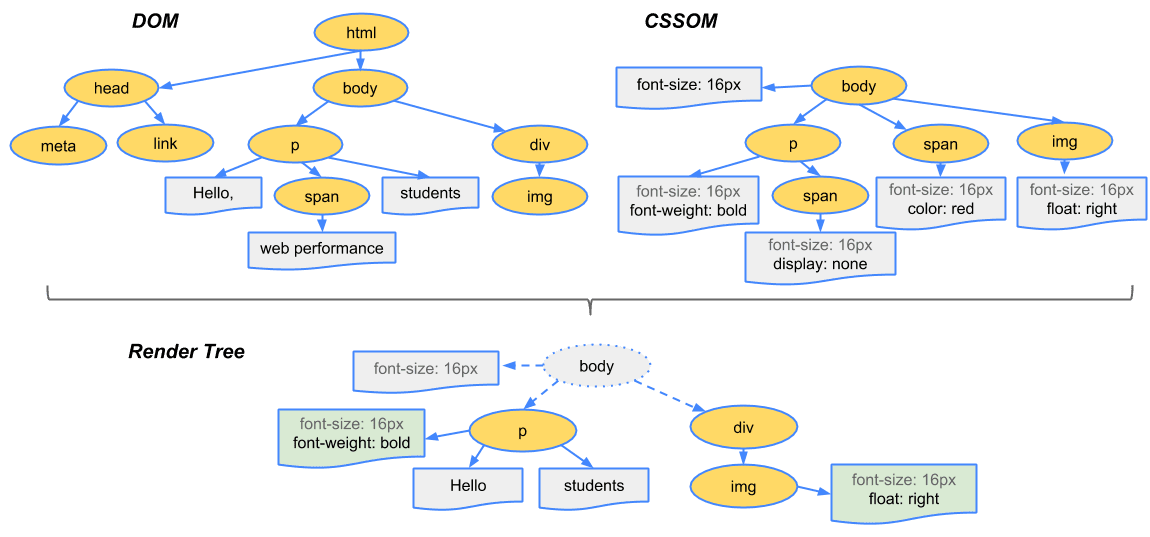
HTML Parsing → DOM Creation
Browser reads HTML line by line.
Example:
<h1>Hello</h1>
<p>Welcome</p>
Browser converts this into a tree-like structure called DOM.
Think of DOM like:
Family tree
Folder structure
Branches and children
DOM = HTML ka structured version
CSS Parsing → CSSOM
CSS is also parsed separately.
h1 { color: red; }
p { font-size: 16px; }
Browser converts CSS into another tree called CSSOM.

CSSOM = Styling rules ka structure
DOM + CSSOM → Render Tree
Now browser mixes:
DOM (what to show)
CSSOM (how to show)
Result?
Render Tree
Important:
Things like display: none are NOT included
Only visible elements matter

Layout (Reflow) – Deciding Position
Now browser calculates:
Where will this text go?
How wide is this div?
Image kitna space lega?
This step is called Layout or Reflow.
Screen ke liye measurement phase.
Paint – Filling Colors & Pixels
Now browser paints:
Text color
Background
Borders
Images
Just like painting a wall after measuring it.
Display – Finally Showing on Screen
After painting:
Pixels appear on your screen
Website is visible
You say: “Page load ho gaya”
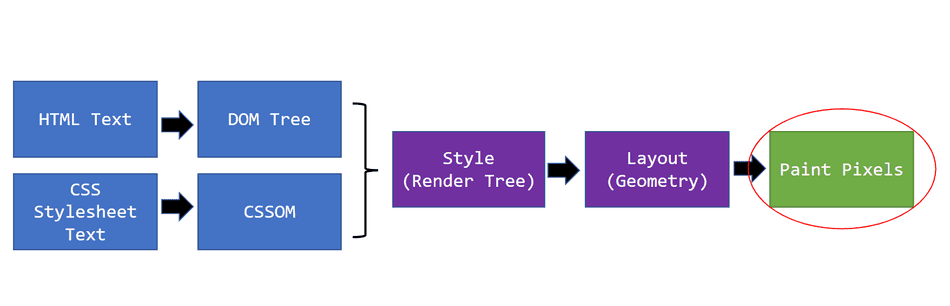
Very Simple Parsing Example
Parsing means breaking something to understand it.
Example:
7 + 3 × 5 - 2
Browser (or compiler) breaks it like:
Numbers
Operators
Priority
Then creates a structure to calculate correctly.
Same idea:
HTML → elements
CSS → rules
JS → instructions
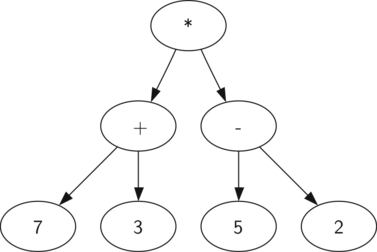
Full Flow: From URL to Pixels
Short version:
You type URL
Browser fetches files
HTML → DOM
CSS → CSSOM
DOM + CSSOM → Render Tree
Layout
Paint
Display


