CSS Selectors 101: Targeting Elements with Precision

When we start learning CSS, one big question comes up:
“CSS likhu kahan?”
“Kaunsa HTML element style hoga?”
That’s exactly where CSS selectors come into the picture.
Think of selectors as ways to choose people in a crowd.
Before giving instructions, you first need to say who should listen, right?
Same thing in CSS.
Why Do We Need CSS Selectors?
Imagine a classroom
Teacher says: “All students stand up”
Or: “Only boys wearing blue shirts stand up”
Or: “Rahul, you stand up”
Each sentence targets different people.
CSS selectors do the same job —
they tell the browser which HTML elements should get the style.
Without selectors, CSS would be useless.
Think of Selectors Like Addresses 🏠
| Real Life | CSS |
| Calling everyone | Element selector |
| Calling a group | Class selector |
| Calling one specific person | ID selector |
Let’s go step by step.
Element Selector – “Sab log suno”
This selector targets all elements of the same type.
Example
<p>Hello World</p>
<p>Namaste India</p>
p {
  color: blue;
}
What happens?
All <p> tags become blue.
Use this when:
You want common styling
Headings, paragraphs, lists, etc.
Rule:
Element selector = broadest targeting
Class Selector – “Sirf ye group”
Class selector targets multiple specific elements.
Class name always starts with a dot (.)
Example
<p class="highlight">Important text</p>
<p>Normal text</p>
<p class="highlight">Another important text</p>
.highlight {
  background-color: yellow;
}
Only elements with class="highlight" get styled.
Use this when:
Same style needed at many places
Buttons, cards, warnings, badges, etc.
Rule:
Class = reusable
ID Selector – “Sirf tu hi”
ID selector targets one unique element.
ID starts with a hash (#)
Example
<h1 id="main-title">Welcome</h1>
#main-title {
  color: red;
}
Only that one heading changes.
Use this when:
Element is unique
Header, main section, special banner
Important
One ID = one element only
Never reuse IDs
Rule:
ID = unique & powerful
Selector Targeting Flow (Conceptual)
Think like this:
HTML Page
 ├── Element (p, div, h1)
 │     ├── Class (.card, .btn)
 │           └── ID (#main, #header)
More specific = more control.

Group Selector – “Tum sab ek saath”
When multiple selectors need same style, group them.
Example
h1, h2, p {
  font-family: Arial;
}
No need to write CSS again and again.
Use this to:
Reduce repetition
Keep CSS clean
Descendant Selector – “Iske andar wala”
Targets elements inside another element.
Example
<div class="box">
  <p>Hello</p>
</div>

<p>Outside</p>
.box p {
  color: green;
}
Only <p> inside .box turns green.
Very useful for:
Layouts
Cards
Sections
Class vs ID – When to Use What?
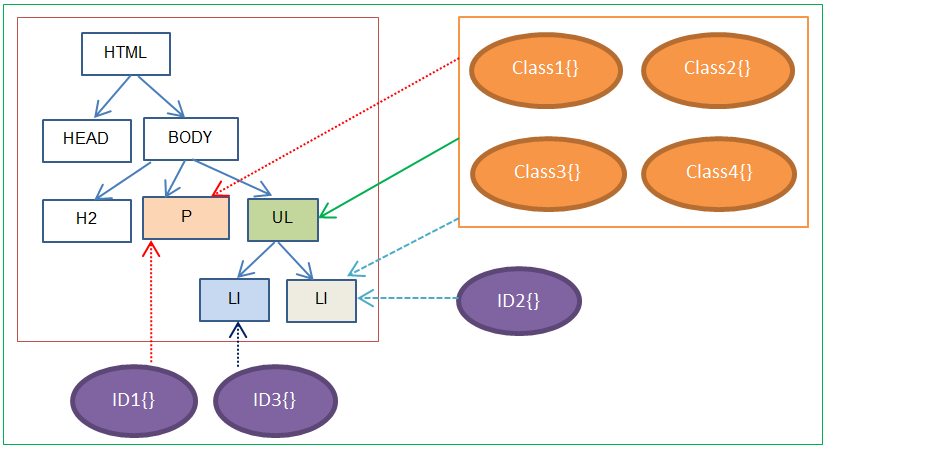
| Feature | Class | ID |
| Symbol | . | # |
| Reusable | Yes | No |
| Usage | Multiple elements | Single element |
| Power | Medium | High |
Golden Rule
Use class 90% of the time
Use ID only when truly needed
Basic Selector Priority (Very High Level)
When multiple selectors target same element:
ID > Class > Element
Example:
p { color: blue; }
.text { color: green; }
#para { color: red; }
👉 Final color = red (ID wins)
Don’t stress too much now —
just remember more specific = more powerful.
Before & After Styling Example ✨
Before CSS
Plain HTML, boring look 😐
After CSS
Using selectors:
Colors applied
Spacing added
Layout looks clean 😍
This magic is possible only because of selectors.


